Posts

Showing posts with the label Compile

How to use Command Prompt (cmd) to get the output of C# program rather than Microsoft Visual Studio ?
Image
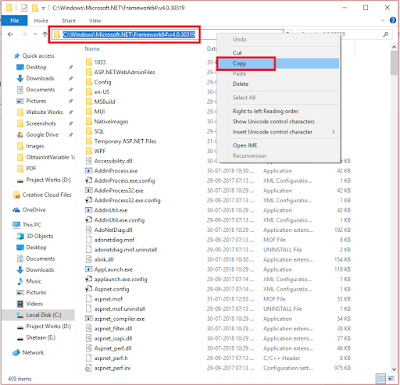
We use Microsoft Visual Studio for the Programming of C# Language. But there is also a way to get output in command Prompt of  Code written in Traditional Notepad. For that we make use of "csc" in Windows Command prompt" (csc : Csharp Compiler is a command for compiling the code) So lets start, Step 1) Open Windows File Explorer (My Computer). Go to the Location " Local Disk C:\ >> Windows >> Microsoft.NET >> Framework 64 >> Framework >> v4.0.xx " and Copy this path. Step 2) Open Control Panel. Go to " System and Security >> System >> Advanced System Settings >> Environment Variables " Click on New . In "Variable Name" type " PATH ". In "Variable Value" Copy paste the address location we have done in Step 1 . Step 3) Open Command Prompt and type " csc ". If you getting something like in the image below than you have properly ...

How to Build, Compile and Run your first Program in C# ?

Image
In this tutorial we will learn some basic things that you should know while programming. Building the first console application A console application is an application that can be run in the command prompt in Windows. For any beginner on .Net, building a console application is ideally the first step to begin with. In our example, we are going to use Visual Studio to create a console type project. Next, we are going to use the console application to display a message "Hello World". We will then see how to build and run the console application. Let's follow the below mentioned steps to get this example in place. Step 1) Open Visual Studio 2017, Click on :  File Menu >> New >> New Project Step 2) Select Visual C# >> Console App (.NET Framework) Then, Name you first Console App, Then, Change the location where you want to save your program ( recommended that you change the location and create a desire folder for all your ...